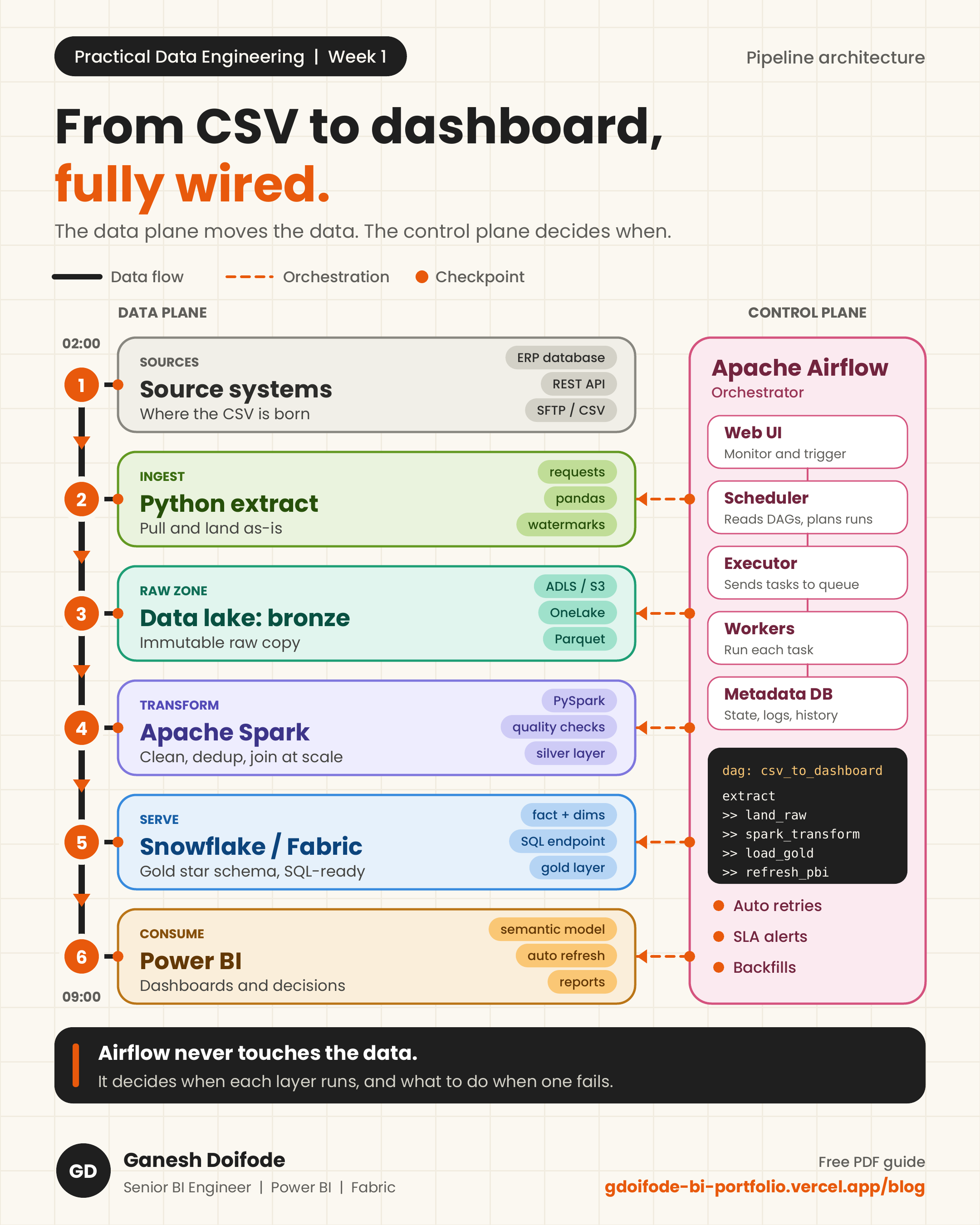
The LinkedIn post shows the flow. This guide goes one level deeper: how the storage is laid out, what the code looks like at each layer, and the design decisions that make the pipeline safe to rerun at 2 AM without anyone watching.
Storage layout: the medallion zones
Every layer writes to its own zone. Nothing is ever edited in place, which is what makes reprocessing possible.
/lake
  /landing/sales/load_date=2026-09-16/   raw CSV exactly as received
  /silver/sales/load_date=2026-09-16/    typed, cleaned, deduplicated Parquet
warehouse
  staging.sales_silver                   silver data loaded for merging
gold.fact_sales, gold.dim_customer star schema served to Power BI- Partitioning by load_date means a rerun of one day touches only that day.
- The landing zone is immutable. It is your replay source if any downstream logic changes.
- Gold is modeled for BI: facts with surrogate keys, conformed dimensions.
Layer 1: Ingestion with Python
Ingestion has one job: move data from the source into landing exactly as received, and do it idempotently so reruns never create duplicates.
import hashlib
import shutil
from datetime import date
from pathlib import Path

LANDING = Path("/lake/landing/sales")

def checksum(path: Path) -> str:
    return hashlib.md5(path.read_bytes()).hexdigest()

def land_file(src: Path, load_date: date) -> Path:
    target_dir = LANDING / f"load_date={load_date:%Y-%m-%d}"
    target_dir.mkdir(parents=True, exist_ok=True)
    target = target_dir / src.name

    if target.exists() and checksum(target) == checksum(src):
        return target  # already landed, safe to rerun

    shutil.copy2(src, target)
return target- No business logic here. Transformations in ingestion code are hard to test and impossible to replay.
- Checksums make the task idempotent: running it twice produces the same result as running it once.
- For APIs and databases, store a watermark (last updated_at loaded) instead of pulling full history every run.
Layer 2: Orchestration with Airflow
Airflow defines the order, schedule and failure handling. It passes parameters to each layer and waits. It never processes the data itself.
from datetime import datetime, timedelta
from airflow import DAG
from airflow.operators.python import PythonOperator
from airflow.providers.apache.spark.operators.spark_submit import SparkSubmitOperator
from airflow.providers.common.sql.operators.sql import SQLExecuteQueryOperator

# land_file_task and trigger_dataset_refresh come from your project package
from pipelines.tasks import land_file_task, trigger_dataset_refresh

default_args = {
    "retries": 3,
    "retry_delay": timedelta(minutes=5),
    "retry_exponential_backoff": True,
    "email_on_failure": True,
}

with DAG(
    dag_id="csv_to_dashboard",
    start_date=datetime(2026, 9, 1),
    schedule="0 2 * * *",
    catchup=False,
    max_active_runs=1,
    default_args=default_args,
) as dag:

    land_raw = PythonOperator(
        task_id="land_raw",
        python_callable=land_file_task,
        op_kwargs={"load_date": "{{ ds }}"},
    )

    spark_transform = SparkSubmitOperator(
        task_id="spark_transform",
        application="/jobs/sales_silver.py",
        application_args=["--load-date", "{{ ds }}"],
        conn_id="spark_default",
    )

    load_gold = SQLExecuteQueryOperator(
        task_id="load_gold",
        conn_id="warehouse",
        sql="sql/merge_fact_sales.sql",
    )

    refresh_pbi = PythonOperator(
        task_id="refresh_pbi",
        python_callable=trigger_dataset_refresh,
    )

land_raw >> spark_transform >> load_gold >> refresh_pbi- {{ ds }} is the logical date of the run. A backfill for 5 September processes exactly 5 September data.
- max_active_runs=1 stops two runs from writing the same partition at the same time.
- catchup=False prevents Airflow from scheduling months of missed runs when you first deploy.
- Retries with exponential backoff absorb temporary failures like network timeouts or a busy warehouse.
Layer 3: Transformation with Spark
Spark turns raw CSV into typed, deduplicated Parquet. This is where data quality is enforced and where the heavy compute belongs.
import argparse
from pyspark.sql import SparkSession, functions as F
from pyspark.sql.window import Window

parser = argparse.ArgumentParser()
parser.add_argument("--load-date", required=True)
load_date = parser.parse_args().load_date

spark = (
    SparkSession.builder.appName("sales_silver")
    .config("spark.sql.sources.partitionOverwriteMode", "dynamic")
    .getOrCreate()
)

schema = "order_id STRING, customer_id STRING, amount STRING, order_ts STRING, updated_at STRING"

raw = (
    spark.read.option("header", True)
    .schema(schema)
    .csv(f"/lake/landing/sales/load_date={load_date}/")
)

typed = (
    raw.withColumn("amount", F.col("amount").cast("decimal(18,2)"))
    .withColumn("order_ts", F.to_timestamp("order_ts"))
    .withColumn("updated_at", F.to_timestamp("updated_at"))
    .filter(F.col("order_id").isNotNull())
)

latest_first = Window.partitionBy("order_id").orderBy(F.col("updated_at").desc())

deduped = (
    typed.withColumn("rn", F.row_number().over(latest_first))
    .filter("rn = 1")
    .drop("rn")
    .withColumn("load_date", F.lit(load_date))
)

(
    deduped.write.mode("overwrite")
    .partitionBy("load_date")
    .parquet("/lake/silver/sales/")
)- An explicit schema is faster than inferSchema and stops types from changing silently when a file looks different.
- row_number over updated_at keeps only the latest version of each order when the source sends updates.
- Dynamic partition overwrite replaces only the partition being processed, so the job is safe to rerun.
Layer 4: Serving in Snowflake / Fabric
Silver data is loaded into a staging table, then merged into the gold fact table. MERGE on the business key makes the load rerunnable. The example uses Snowflake syntax. In a Fabric Warehouse, the same pattern works with MERGE or a DELETE and INSERT for the load date.
MERGE INTO gold.fact_sales AS tgt
USING (
    SELECT
        s.order_id,
        d.customer_key,
        s.amount,
        CAST(s.order_ts AS DATE) AS order_date,
        s.updated_at
    FROM staging.sales_silver AS s
    JOIN gold.dim_customer AS d
      ON d.customer_id = s.customer_id
     AND d.is_current = TRUE
) AS src
ON tgt.order_id = src.order_id
WHEN MATCHED AND src.updated_at > tgt.updated_at THEN UPDATE SET
    customer_key = src.customer_key,
    amount       = src.amount,
    order_date   = src.order_date,
    updated_at   = src.updated_at
WHEN NOT MATCHED THEN INSERT (order_id, customer_key, amount, order_date, updated_at)
VALUES (src.order_id, src.customer_key, src.amount, src.order_date, src.updated_at);- The updated_at guard stops an older file from overwriting newer data during a backfill.
- Surrogate keys from dim_customer are resolved here, so Power BI receives a clean star schema.
- Business logic lives in SQL in the warehouse, not in DAX, which keeps the semantic model simple and fast.
Layer 5: Refreshing Power BI
Instead of a fixed refresh schedule, the last Airflow task triggers the refresh through the Power BI REST API. Dashboards update only after the data has actually landed.
import requests

def trigger_dataset_refresh(workspace_id: str, dataset_id: str, token: str) -> None:
    url = (
        f"https://api.powerbi.com/v1.0/myorg/groups/{workspace_id}"
        f"/datasets/{dataset_id}/refreshes"
    )
    response = requests.post(
        url,
        headers={"Authorization": f"Bearer {token}"},
        json={"notifyOption": "NoNotification"},
        timeout=30,
    )
response.raise_for_status() # 202 Accepted means the refresh is queued- Get the token with MSAL using a service principal, not a personal account.
- Poll GET .../refreshes?$top=1 until the status is Completed, and fail the task if it returns Failed.
- A fixed 9 AM refresh can show half-loaded data if the pipeline runs late. An event-driven refresh cannot.
Production checklist
- Idempotent at every layer: rerunning any day gives the same result.
- Raw data is immutable and replayable.
- Explicit schemas and types are enforced at the silver layer.
- Retries with backoff in Airflow, with alerts on final failure.
- Row count and null checks between layers (Week 3 covers this in detail).
- Secrets live in Airflow Connections or a vault, never in code.
From my own work
My Python ETL pipelines load incrementally into Oracle, and Power BI reads curated tables from there. The same principles apply: land raw, transform once in the database layer, and keep the report layer thin.